ripeflow
What we have built

We build and run our own products.

DeskVNC gives AI agents access to real computers with human takeover. GodwinMix supports live production. BrowserGlass works with browser tasks, and psmux keeps terminal sessions running on Windows. Explore the public software and talk to us about fitting it to your business.

The products

What we built, and the service each one powers.

Each card says what the product does and which of our services it sits under.

  • DeskVNC

    In active development

    Computer control connected to an AI workflow

    Remote desktop access and tools that let AI agents see and operate computers, with permission and human takeover.

    • Remote desktop connections
    • MCP tools for viewing and input
    • Human takeover controls
  • GodwinMix

    In active development

    Custom software for real production workflows

    Open source live production software combining media sources, scenes and graphics.

    • Media sources and scenes
    • Graphics and production controls
    • Interfaces for AI workflows
  • psmux

    Engineering tools built around how developers work

    A native Windows terminal multiplexer for persistent sessions and coding agents.

    • Native Windows terminal sessions
    • Panes and layouts
    • Detach and reattach workflows
  • BrowserGlass

    In active development

    Browser workflows people can watch and take over

    Browser automation with live viewing and human control for workflows an AI or script can operate.

    • Live browser viewing
    • Automation and human control
    • Public examples
The stories

What each one solved, and why it was hard.

The same four questions for every piece of work: what was going wrong, why it was hard, what it does now, and what that is worth.

Every figure, with its condition

  1. DeskVNC

    Remote desktop access and tools that let AI agents see and operate computers, with permission and human takeover.

    In active development

    Go and look at it

    The problem

    Some useful business tasks span desktop applications that have no suitable integration.

    Why it was hard

    A computer workflow needs a way to observe the screen, provide input and hand control back to a person.

    What it does now

    DeskVNC connects remote desktop access to tools an AI can operate.

    What it is worth

    Ripeflow can use it as the starting point for a workflow around existing applications.

  2. GodwinMix

    Open source live production software combining media sources, scenes and graphics.

    In active development

    Go and look at it

    The problem

    Live production brings together sources, scenes and graphics that an operator needs to coordinate.

    Why it was hard

    The controls must make sense during a production, with the output and operator workflow planned together.

    What it does now

    GodwinMix brings media and production controls into an application with interfaces for AI workflows.

    What it is worth

    It is a starting point for a production setup and custom workflows around it.

  3. psmux

    A native Windows terminal multiplexer for persistent sessions and coding agents.

    Go and look at it

    The problem

    Developers on Windows need persistent terminal sessions for coding tools and agents.

    Why it was hard

    Native Windows terminals behave differently from Unix terminals, so session and pane handling need a Windows implementation.

    What it does now

    psmux provides native Windows terminal sessions with panes, layouts and detach and reattach workflows.

    What it is worth

    Developers can keep their working sessions organized while using coding agents.

  4. BrowserGlass

    Browser automation with live viewing and human control for workflows an AI or script can operate.

    In active development

    Go and look at it

    The problem

    Browser tasks often need both automated steps and a person who can inspect what is happening.

    Why it was hard

    The person and the automation need to work with the same browser state and pass control deliberately.

    What it does now

    BrowserGlass combines browser automation with live viewing and human control.

    What it is worth

    The public examples provide a starting point for a browser workflow adapted to a business process.

How it works underneath

Swarms of AI agents,
working across
your computers.

Harness engineering, done right.

We build AI agents that operate desktops, browsers, servers, cameras and live video, many machines at once, and the engineering that keeps every one of them in check. See the real tools at work on this page.

See it at work here. No sign up.

Watch the AI run a live show on its own. When a camera dies on air, it notices and fixes it without anyone asking. Click a command to have it put breaking news, a name or a ticker on screen.

Playing every demo by itself. Click anything to take over.
GodwinMixWhat viewers seeready to cut
Presenter camera on airON AIRAI watchingCAM2 Presenter
BREAKING

YouTube liveFacebook live
Give the AI a command.Click one and watch it go on air.
AI producer

The AI is watching the live show for you. If a camera dies on air it notices and fixes it by itself. Click a command below to put graphics on screen.

Or click a camera to cut to it yourself.

A replay that runs inside this page and touches nothing on your computer. The AI is Claude. The software it drives, and the rules that stop it, are ours, taken from the real products and the recordings below.

Parallel agents, under control

One job. Eight machines.
Watch them split it.

A coordinator hands work to as many agents as you allow. Each agent holds one machine. When a machine drops, only that machine is retried. Take any one of them back and the rest carry on.

Coordinator · dvv_group8 machines, 4 agents at once
0 working8 queued0 done
0.0 s
Timeline4 agents: machines overlap
office-pc-1
office-pc-2
front-desk-pc
browser-1
browser-2
files-server
cam1 · Stage
cam2 · Lectern

    Click any machine to take it over; the rest keep working. Slide the agent count while it runs. The machines, jobs and timings are an illustration. The control rules, one lease per machine, members run concurrently, each outcome reported on its own, are how DeskVNC's group tools work.

    Harness engineering

    The model is one part.
    We build the rest.

    Claude can reason. It cannot see a programme feed, hold a desktop, or know it should stop. Everything an agent touches in these demos is software our team wrote: the tools, the limits, the leases and the coordination that keep a swarm of agents doing the right work. Turn a card over to see it in the product.

    DeskVNC / Access with human control

    The computer stays
    in view.

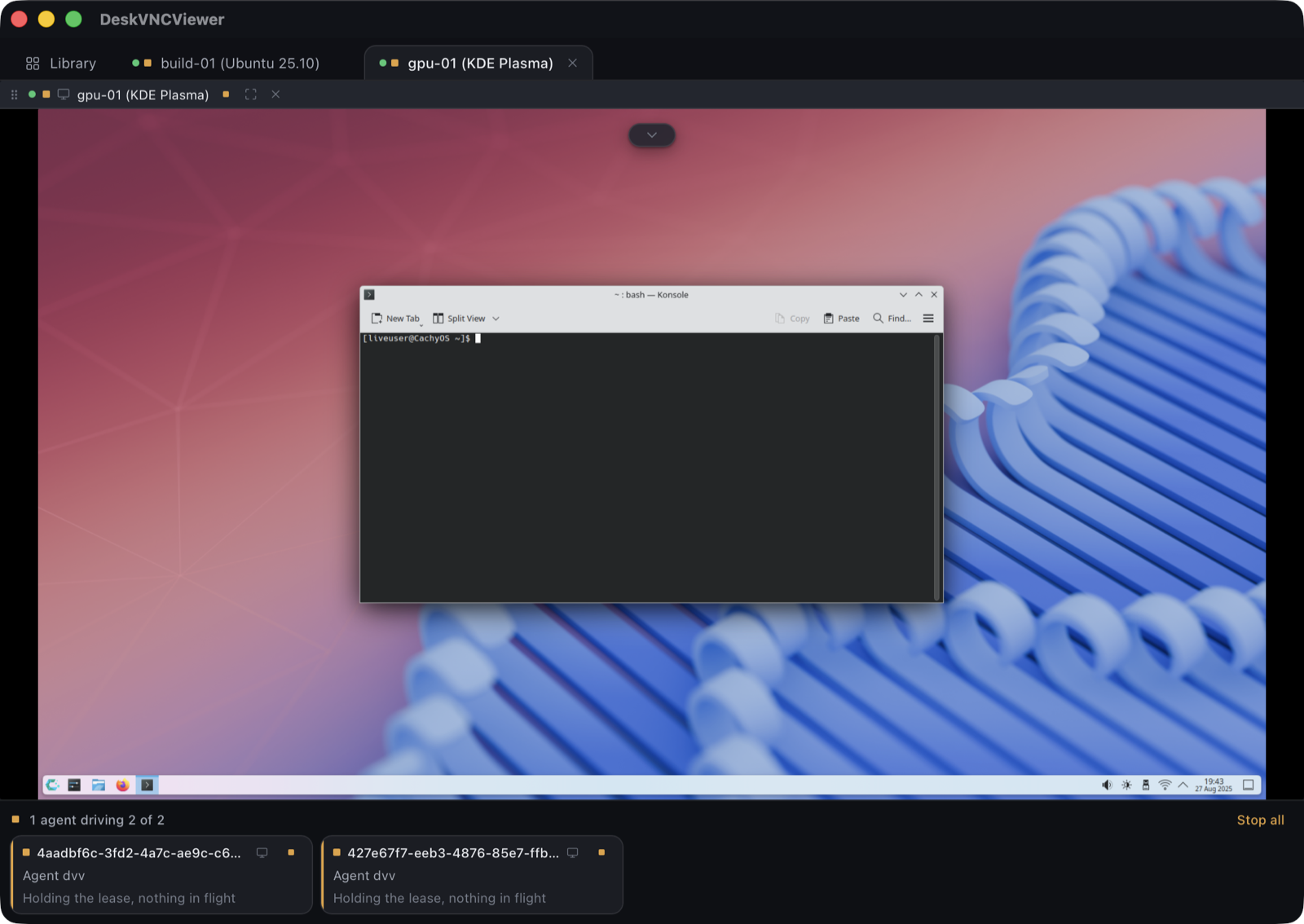
    An AI agent needs a way to see a screen and act on it. DeskVNC provides the desktop connection and input tools, with visible control ownership and a way for a person to step in.

    DeskVNC application showing connected desktops, two agent control leases and the Stop all control
    Actual DeskVNC interfaceAgent ownership and Stop all are visible below the desktop.

    For example, an agent can read information from a document and enter it into an existing office application, with a review step before submission. We configure the workflow and access for your team.

    Explore DeskVNC

    psmux / For engineering teams

    Type into it.
    It answers.

    psmux is our native Windows terminal multiplexer. It speaks the tmux command language, so split a pane, start an agent, detach and come back. The session keeps running while you are gone.

    Explore psmux
    Windows Terminal · PowerShell
    PS C:\Users\you>
    >

    Instanet / Internet Generator

    Cut a link.
    Watch the router answer.

    We built the router and gateway software behind Instanet. Pick a routing strategy and break a connection to see what each one does with your traffic.

    Your siteInstanet routerInternetper link NATFiber 300Cable 1505G 80LTE 40
    0 Mbpsone download
    All traffic together
    0 Mbps
    Links carrying traffic
    1 of 4

    Everything uses the highest priority link that passes its health check. When it fails, the route moves to the next one.

    1. health checks passing on wan1 to wan4

    Click any link to cut it, then click again to restore it. Link speeds are an illustration and the readouts are the arithmetic of each strategy, not a measured result.

    Failover, weighted and round robin routing, and bonding over multipath TCP or Glorytun tunnels are all part of the software we engineered.

    Our connectivity engineering

    Recorded, not rendered

    Real sessions with our software

    The same work,
    on camera.

    These play as soon as they are on screen. Jump to any step: each chapter is a caption from the recording itself.

    Recorded session

    Edited presentation of a real Claude Code session. Waiting periods shortened. Stock footage supplies the camera feeds. Recording details and credits.

    Tell us what is taking your team's time.

    Thirty minutes with an engineer, free. You leave with a written page on what to automate first, and a written quote if you want us to build it.